We have just completed the majority of our Breadcrumb navigation updates throughout the platform. Knowing where you are at all times, and navigating effortlessly from section to section and page to page quickly within a robust software platform is critical for workflow efficiency. This is why we have spent time to overhaul page level navigation to include Breadcrumb naming and icon conventions to help user flow.
The images below show Station level Breadcrumb navigation two levels deep within the workflow. The first image displays the name of the Station “Long Live Rock” which indicates the page you have navigated to, nested one level deep. Any Breadcrumb that is underlined is also editable. The "Back" Breadcrumb indicates that you can navigate back to the top level Station section:
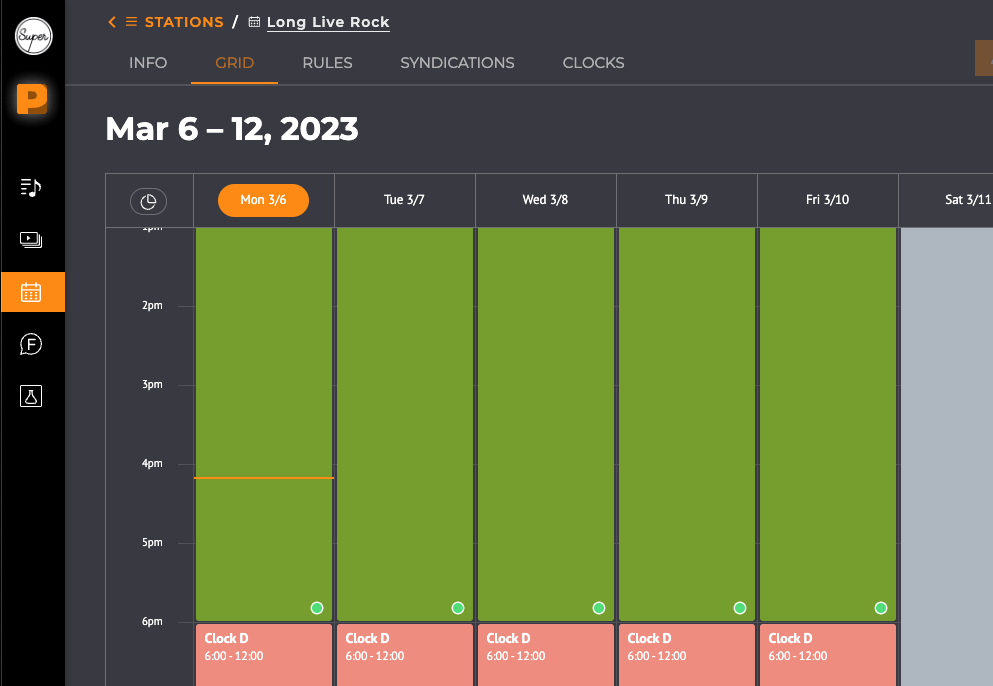
Upon clicking into “Clock C”, the Breadcrumb navigation shows that you are now within the Clock Details Page, within the Station “Long Live Rock”. Identifying the page level and offering up an easy means to use the “Back” button allows you to get in and out of the Clock view with ease.
.png)
---
Release Notes:
Content:
Content Upload now ensures that only supported audio file types can be uploaded and queued for ingestion and data analysis. This was a requested user feature after encountering issues with uploading unsupported file types.
Stations:
- Certain workflows rendered the last item within the side search panel to be cutoff, and has now been fixed to no longer cut off needed information.
- Within the Rules section, the Breadcrumb displayed incorrectly after navigating back and forth from Station to Clock rule, and has since been resolved.
- An issue was resolved wherein certain cases a user was unable to reorder their Clock list after adding Smart Folders and Content items to the Clock list.
Streams:
A fix was implemented where the date control within the Stream Details Page was displaying the previous day on the now playing view rather than the current day.
General/Global:
User Email template updates have been included to conform to the latest SHF website tone of voice and language.
When updating a Playlist, the Relationships with Categories within Clocks sometimes were not synching quickly when the user made updates, this issue has now been resolved.


